RERO ILS lets external services (resource providers, partner applications…) authenticate library users via OAuth 2.0 and retrieve a limited set of information about them.
RERO ILS acts as the authorization server and the resource server, your application is the client. For the protocol itself, see OAuth, RFC 6749 or Wikipedia.
1. Overview
RERO ILS uses the Authorization Code flow, in three steps:
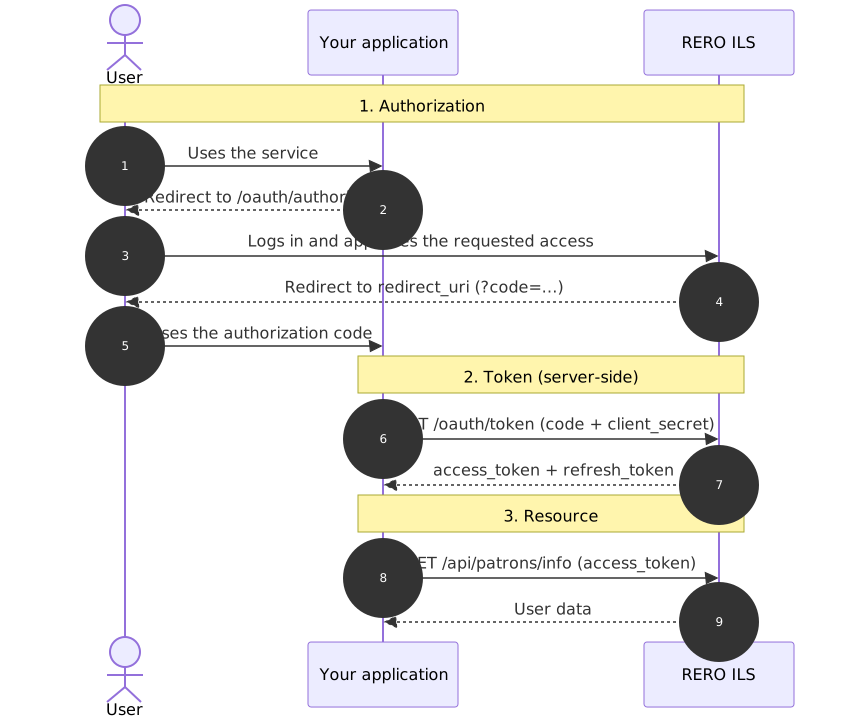
- Authorization - you redirect the user to the authorization endpoint; they log in and approve (or refuse) the requested data. RERO ILS sends them back to your
redirect_uriwith a single-use authorization code. - Token - your server exchanges this code (together with your
client_secret) for anaccess_tokenand arefresh_token. - Resource - you use the
access_tokento query/api/patrons/info.
⚠️ Steps 2 and 3 run server-side: the
client_secretand the tokens must never reach the browser or a mobile application.
2. Endpoints
Responses in JSON, over HTTPS only.
| Purpose | Method | URL |
|---|---|---|
| Authorization | GET |
https://bib.rero.ch/oauth/authorize |
| Token (exchange + refresh) | POST |
https://bib.rero.ch/oauth/token |
| User information | GET |
https://bib.rero.ch/api/patrons/info |
To test without affecting production, replace
bib.rero.chwithbib.test.rero.chin every example.
3. Token lifetimes
| Token | Validity | Notes |
|---|---|---|
authorization_code |
a few dozen seconds | single use: exchange it immediately |
access_token |
1 hour | for API calls |
refresh_token |
long-lived | to renew an expired access_token |
Only one set of tokens is active per application and per user. Issuing a new token invalidates the previous one: keep only the latest one received.
4. Registering an application
- On bib.rero.ch, create an account (My account > Sign up) with a working, unique e-mail address; it will be shown to the users of your service.
- Log in, then go to Applications and choose New application.
- Declare one or more redirect URIs (see below) and note your
client_idandclient_secret.
redirect_uri: the one sent during authorization must match exactly a registered URI (scheme, domain, path, parameters). Any difference (trailing slash,http/https, subdomain) causes aninvalid_requesterror.
5. Testing the connection
If you are commissioned by a library, ask them for a test patron account and for the criteria that do or do not allow the connection (typically institution, expiration_date, patron_type).
A plain site account (step 4) is not enough: until it is linked to a registered patron, the response does not contain the
patron_infoblock and therefore does not let you test those criteria.
6. Step 1: Get an authorization code
Redirect the user to the authorization endpoint:
| Parameter | Required | Value | Description |
|---|---|---|---|
response_type |
yes | code |
fixed value |
client_id |
yes | identifier | your application identifier |
redirect_uri |
yes | URL | must match a registered URI |
scope |
yes | scopes | requested data, space-separated (at least one) |
state |
recommended | opaque string | anti-CSRF value to verify on return |
GET https://bib.rero.ch/oauth/authorize?
    response_type=code&
    client_id={CLIENT_ID}&
    redirect_uri=https://your-domain.ch/oauth/callback&
    scope=fullname%20institution%20expiration_date%20patron_type&
    state={RANDOM_VALUE}
Scopes are separated by a space (encoded
%20or+in the URL), never by a comma.
Scopes
Three fields are always returned, without any scope:
user_id- unique technical identifier. Use it only for users not linked to a library.patron_info.{institution}.patron_pid- the user's identifier in each institution where they are registered (present only for a registered patron).barcode- deprecated, do not use.
Then request one or more scopes (at least one required):
| Scope | Returned data |
|---|---|
fullname |
Last and first name (format Last, First) |
birthdate |
Date of birth (YYYY-MM-DD) |
institution |
Code of the institutions where the user is registered |
expiration_date |
Registration expiration date, per institution (ISO 8601) |
patron_type |
Code of the patron type (string defined by the library, e.g. "vs-pm"). This code is specific to each institution and optional: the field is absent if no code is defined. |
The
patron_typesscope (plural) is deprecated. Use thepatron_infoformat.
7. Step 2: Exchange the code for a token
RERO ILS redirects the user to your redirect_uri with the code (and the state):
GET https://your-domain.ch/oauth/callback?code={CODE}&state={RANDOM_VALUE}
Verify the state, then exchange the code immediately, server-side:
POST https://bib.rero.ch/oauth/token
Content-Type: application/x-www-form-urlencoded

client_id={CLIENT_ID}
&client_secret={CLIENT_SECRET}
&grant_type=authorization_code
&code={CODE}
&redirect_uri=https://your-domain.ch/oauth/callback
Common mistake: the body must be a form (
application/x-www-form-urlencoded, ormultipart/form-dataas a fallback), never JSON, and theredirect_urimust be identical to the one from step 1.
Response:
{
    "access_token": "4NPtBhoiBmML6k7cDe9RdcrXrHl7XR",
    "expires_in": 3600,
    "token_type": "Bearer",
    "scope": "fullname birthdate institution expiration_date patron_type",
    "refresh_token": "iic37JVAq71uLDu3jzHWdT958qh01D"
}
| Parameter | Description |
|---|---|
access_token |
access token for API calls |
expires_in |
validity in seconds (3600 = 1 h) |
token_type |
Bearer (only value used) |
scope |
scopes actually granted |
refresh_token |
refresh token (see "Refreshing an expired access token") |
8. Step 3: Retrieve the user information
Query /api/patrons/info with the access_token, either via a header (recommended) or a parameter:
GET https://bib.rero.ch/api/patrons/info
Authorization: Bearer {ACCESS_TOKEN}
GET https://bib.rero.ch/api/patrons/info?access_token={ACCESS_TOKEN}
Example for a user registered in two institutions (vs and rbnj), all scopes granted:
{
    "user_id": 7653,
    "fullname": "Ziegler, Jean",
    "birthdate": "1934-04-19",
    "barcode": "xxxxxxxxxxx",
    "patron_info": {
        "vs": {
            "patron_pid": "316784",
            "institution": "vs",
            "patron_type": "vs-pm",
            "expiration_date": "2027-03-30T00:00:00"
        },
        "rbnj": {
            "patron_pid": "876",
            "institution": "rbnj",
            "expiration_date": "2029-08-24T00:00:00"
        }
    }
}
- Only the fields of the granted scopes appear; fields without a value are omitted (here,
rbnjhas nopatron_type). patron_infois indexed by institution code: iterate over all entries, as a user may belong to several institutions.patron_infois absent if the account is not linked to a registered patron (see "Testing the connection").- A client library must tell you which criteria (institution, expiration, type…) grant access to your service.
9. Refreshing an expired access token
Renew the access_token without re-authorizing the user, via a POST form:
POST https://bib.rero.ch/oauth/token
Content-Type: application/x-www-form-urlencoded

client_id={CLIENT_ID}
&client_secret={CLIENT_SECRET}
&grant_type=refresh_token
&refresh_token={REFRESH_TOKEN}
The response has the same structure as in step 2. A new refresh_token may be returned: always keep the latest one. If the refresh_token is no longer valid, restart the flow from step 1 ("Get an authorization code").
10. Errors and consent refusal
User refusal: if the user refuses on the authorization screen, RERO ILS redirects to your redirect_uri with error instead of code. Detect this case and do not call the token endpoint:
GET https://your-domain.ch/oauth/callback?error=access_denied&state={RANDOM_VALUE}
On the authorization endpoint (redirect with error / error_description, RFC 6749 §4.1.2.1):
error |
Likely cause |
|---|---|
access_denied |
the user refused |
invalid_request |
missing parameter or non-conforming redirect_uri |
unauthorized_client |
unknown or unauthorized client_id |
invalid_scope |
nonexistent or unauthorized scope |
unsupported_response_type |
response_type ≠ code |
On the token endpoint (JSON, HTTP 4xx, RFC 6749 §5.2):
error |
Likely cause |
|---|---|
invalid_grant |
code expired, already used, or different redirect_uri |
invalid_client |
incorrect client_id / client_secret |
unsupported_grant_type |
unsupported grant_type |
invalid_request |
malformed body (e.g. JSON instead of a form) |
On /api/patrons/info - 401: token missing, invalid or expired; 403: required scope not granted.
11. Logout and revocation
There is no token revocation endpoint (
/oauth/revoke) nor any OAuth logout via API. Invalidation relies on:
- Expiration - the
access_tokenexpires after 1 h; not renewing it lets access end when therefresh_tokenexpires. - Client-side - ending the session in your application is your responsibility (delete the stored token); no call to RERO ILS is required.
- User revocation - from their account, under Applications; your subsequent calls then receive a
401. - Rotation - re-authorizing the user issues a new set of tokens and invalidates the previous one.
Ending the RERO ILS session (Single Sign-Out)
To also close the user's browser session on RERO ILS (so that the next authorization prompts for their credentials again), redirect them from your own logout to:
GET https://bib.rero.ch/signout/
- This route closes the browser session but does not revoke the OAuth tokens already issued (delete them on your side).
- No automatic return to your site: the
?next=parameter only accepts URLs on thebib.rero.chdomain; any external URL is ignored and the user lands on the RERO ILS home page.
12. Security best practices
- HTTPS everywhere, including your
redirect_uri. - Secret and tokens server-side only - never in a browser or a mobile app.
state- generate a random value, store it in the session and verify it on return (anti-CSRF).- Authorization code - exchange it right away; do not log it, do not reuse it.
- Least privilege - request only the scopes you need.
- Storage - tokens encrypted at rest, restricted access, latest set only.
13. FAQ
patron_info is missing from the response. - The account is not linked to a registered patron; only user_id (and possibly barcode) are returned. Ask for a test patron account (see "Testing the connection").
An expected field (e.g. patron_type) is missing. - Either the scope was not granted, or the data does not exist for this user.
The token endpoint returns invalid_request / invalid_grant. - Check: body as x-www-form-urlencoded (not JSON), redirect_uri identical to step 1, code not expired or already used.
redirect_uri_mismatch at authorization. - The redirect_uri does not exactly match a registered URI (trailing slash, subdomain, http/https).
My old tokens no longer work after a new login. - This is normal: only one set of tokens is active per application and per user.
How do I log the user out or revoke a token via API? - See "Logout and revocation".